
Guided owner tour · 5 steps
Review your agency's financial performance
Start the management review from evidence, without assembling the picture by hand. Review profit and plan alongside the book behind the result. Investigate what changed and decide where to focus. Each answer keeps its source and period.
KEELRIDGE SOFTWARE · REVIEWED · Screens come from a fictional, read-only agency.
 Owner viewOpen this page in the live demo →
The short answer
Start with the result. Follow the evidence. Decide where to focus.
Is revenue turning into profit?
Read the financial result against the comparison period and plan. Identify the changes that deserve a closer look.
What sits behind the change?
Inspect Book movement, retention and ledger differences. Ask supported follow-up questions of the authorized evidence with the Keelridge Assistant.
Where does management need to focus?
Use the evidence to choose the next review or conversation. Managers and account teams follow through within their responsibilities.
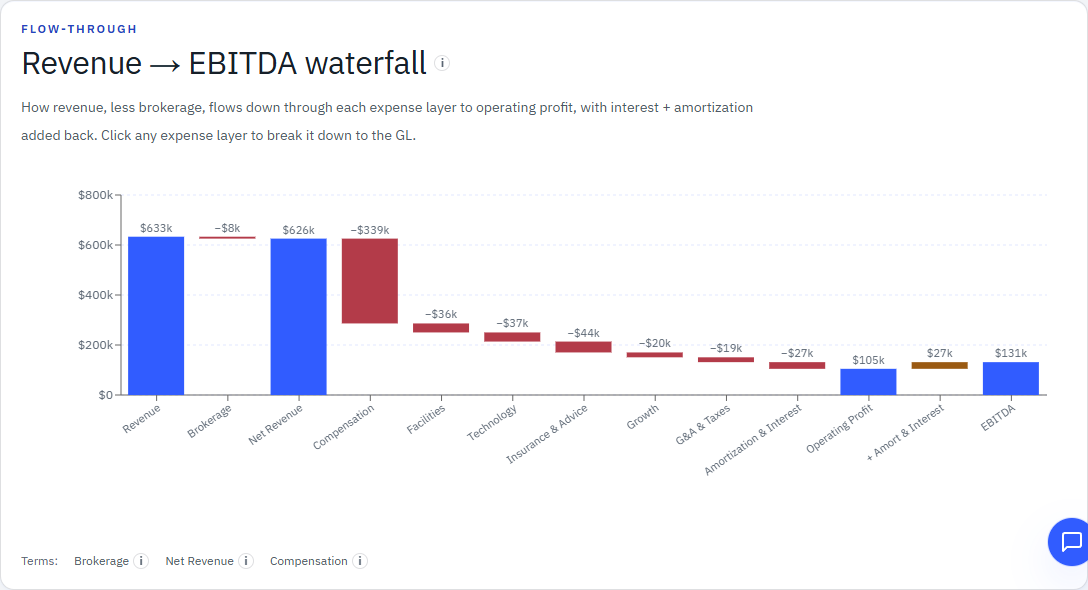
Start with whether revenue is turning into profit.
Follow booked revenue through expenses to operating profit and EBITDA. Compare the same period with last year, then inspect the accounts behind the change. Keep the active adjustments and reporting period in view.
The Budget view adds actual results against plan by month and year to date. The management question is whether the result is developing as expected and which variance needs investigation.
Ask the next question. “Are we more profitable, or just generating more revenue?” The Keelridge Assistant retrieves authorized figures and links the answer to its evidence.
See the recorded fictional answer →Explore this owner P&L in the live demo →
Owner viewOpen this page in the live demo →
Look at the book behind the financial result.
Bridge opening annual premium to closing annual premium through business lost, change on customers who stayed and business gained. Retained-customer change can reflect price or exposure movement; premium growth alone does not show that the agency gained more customers.
This view answers a different question from booked revenue. It describes the in-force Book between two named AMS snapshots.
See the public Book movement formula →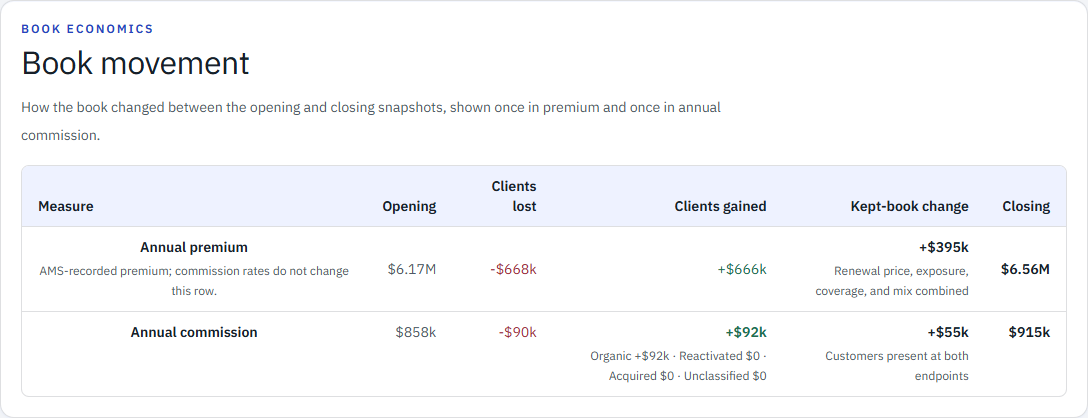 Owner viewOpen this page in the live demo →
How much of the opening book stayed?
Client retention counts each relationship in the opening cohort once. Premium and commission retention weight that same cohort by its opening premium and opening annual recurring commission, so the owner sees how much of the opening book stayed, without counting renewal price movement as retention. Their gaps show whether the customers who left were larger or smaller than average.
Renewal rate is a separate measure: current renewed-line commission against opening-book commission. Renewal price and exposure movement stay in change on retained customers.
A defensible view states the cohort, weighting date, as-of dates, and treatment of cancellations, rewrites, and missing identifiers.
Why the two retention measures disagree →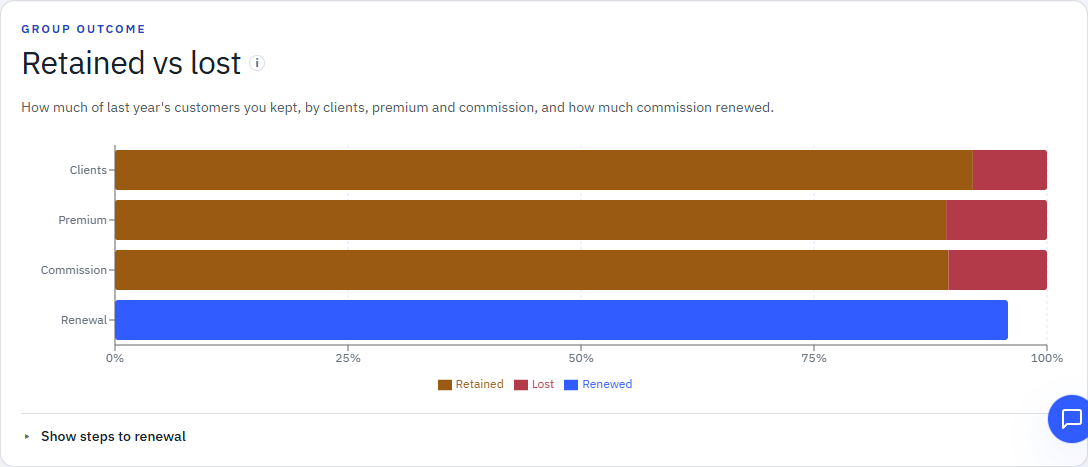 Owner viewOpen this page in the live demo →
Do the book and the P&L tell the same story?
Keelridge compares trailing-twelve-month booked GL P&C commission with the Book's earning power averaged over those same months. Direct-bill modeling and six-month annualization stay disclosed inside earning power; contingency and other out-of-scope streams stay outside the tie-out.
Growth from the window average to earning power today is shown separately. The remaining signed amount stays Timing & unexplained rather than being forced into an unsupported cause.
See the complete commission-income explanation →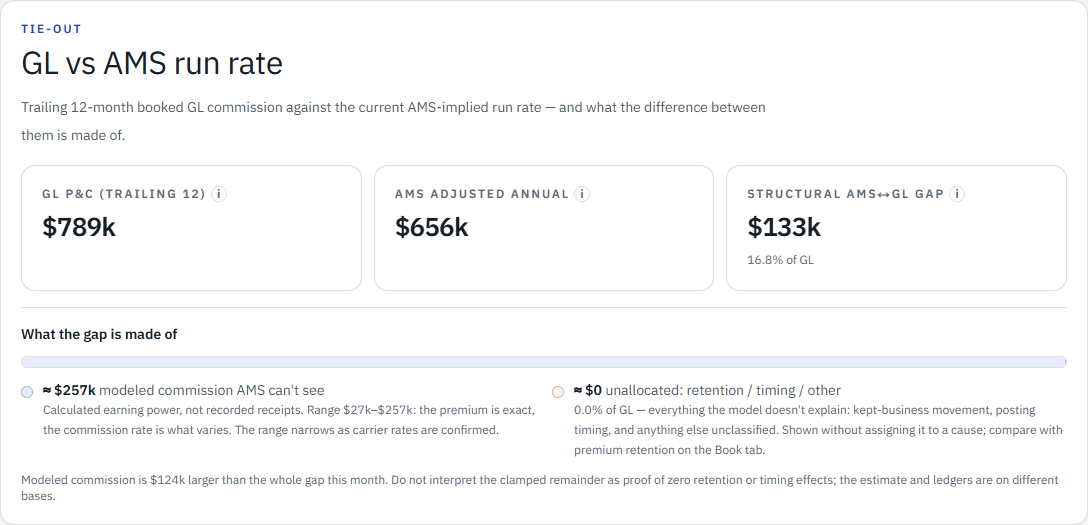 Owner viewOpen this page in the live demo →
Carry the review into the next decision.
After setup, authorized staff upload supported reports, review validation and confirm the update. A monthly review is a useful rhythm; files can be refreshed whenever supported reports are available. The owner does not have to collect several account-manager reports and retype every input before the conversation can begin.
Review what changed, investigate the evidence and decide which questions need follow-through. Managers and account teams use the context their roles allow; the review does not automatically route findings into tasks.
See how Keelridge handles sources and boundaries →Before acting on the result
Use the evidence with the right context.
- Keep the source and period attached.Every useful figure should name its source, period, and reporting basis.
- Leave unresolved differences visible.A remainder is a review item, not permission to invent a reconciliation.
- Correct records in their source systems.Policy, client, transaction, and accounting corrections stay in the system that owns them.
- Keep sensitive economics with the right roles.Commission, payout and profitability stay executive-only. Managers and account teams receive appropriate views and context, not unrestricted access to agency economics.
Questions from agency owners
Before using the review in your agency.
What should an independent insurance agency owner include in a monthly financial review?
Start with booked revenue, expenses and profit against the same prior-year period and the agreed plan. Then investigate Book movement, opening-cohort retention and the same-window Book-to-ledger comparison. Use those views to identify management questions, decide where to focus and give managers or account teams context within their roles.
What information does Keelridge need?
A supported book-of-business export and usable income statements or approved accounting reports, whether accounting lives within the AMS or a separate system. Setup maps and validates the actual reports, definitions and roles. Agency staff upload supported updates when available and confirm validation before the views refresh. A monthly review is a useful rhythm, not an upload limit.
Can I ask follow-up questions without rebuilding the review?
The Keelridge Assistant retrieves authorized figures and evidence links for supported questions in plain English. It is read-only; people interpret the answer and decide what follows. The Product page includes a recorded fictional answer. The public demo opens an Assistant notice rather than analytical chat.
Does Keelridge replace the AMS or accounting system?
No. The AMS remains authoritative for policies, clients, service history, and insurance transactions; accounting remains authoritative for posted financial activity. Keelridge compares and explains those sources without silently making them agree.
Your agency’s management review
Bring the financial questions you need to answer.
Book a 30-minute owner walkthrough using fictional agency data. Discuss the review you assemble today and the questions that take another round of work. No agency files are needed for the conversation.
Review the design-partner pilot terms →